

Crimson CMS - HYBRID
Access Crimson HYBRID from ANYWHERE on any OS AND ALSO with a locally installed instance
Manage your members and their dependents’ data
Management payments, pledges, and donations
Print donation receipts
Generate End-of-Year Contribution Letters with a few clicks
Track leadership of various department, ministries, or committees
Reserve and manage hall, chapel, or edifice for rent at custom rates
Print hall/room reservation applications with applicable policies
Leverage Outreach Tool to communicate with members 24x7
Why Use Crimson HYBRID?
Dibrosoft’s Crimson Church Management Software (CMS) facilitates effective and efficient pastoral care through spiritual leaders by simplifying church operations management and making crucial and pertinent membership data available to pastors with a few mouse clicks.
Separate functions and increase security with a Member Admin, Finance Admin, and System Admin roles. Ensure accountability with the built-in Audit Trail System. The Audit Trail System allows a System Admin to review and analyze all actions taken within the CMS to determine who did what when.
Crimson CMS provides content management capabilities for its companion Mobile Outreach Tool/App. The settings here control or determine the content that your members see when using the Crimson Mobile Outreach Tool/App. For a sample or to see how this can be used, use this Client Key CCD-2051-145 to view our Crimson Mobile Outreach Tool/App Church Demo.
The Crimson Mobile Outreach Tool is included in your Crimson CLOUD license at no additional cost.
With Crimson HYBRID, an organization can use both Crimson CLOUD and Crimson LOCAL. This option gives the benefit of working from anywhere (with CLOUD) and leveraging the Facility Management feature of Crimson LOCAL.
Capabilities & Features
-
- Separation of functions (Member Admin vs Financial Admin vs System Admin)
- Audit Trail (reporting of who did what when)
- Members and dependents management
- Ministry/Department management
- Facility management & Rental Applications + Forms
- Donations managements & receipts
- Payment (incoming) management
- End of Year Giving Summary
- End of Year Donation summary
- Outreach Mobile tool (allows members to stay abreast of happenings and submit confidential prayer requests
- Capacity to send bulk text messages as individual texts (requires card on file) -
Features of Crimson® Hybrid (Hybrid Application + Hybrid Database)
MEMBERS
Manage Members (add/update/import)
Manage Members’ Dependents
Join or Leave a Ministry/Department
FINANCIAL
Add/Edit Payments
Add/Edit Donations
Print Donation Receipts
Add/Edit Pledges
Revenue Summary
Financial Summary
ACTIVITIES
Add/Edit Types of Activities/Events
Record Event Attendance
Maintain Visitor Log
SYSTEM FUNCTIONS
Add/Edit Payment Types
Add/Edit Payment Forms
Add/Edit Marital Status
Add/Edit Member Status
Add/Edit Ministries/Departments
Add/Edit Member Types
Add/Edit Currencies
Create/Edit User Accounts
Reset Users’ Passwords
Custom Configuration (logo, signatures, address)
REPORTS
Audit Trail
End of Year Donations Letter
End of Year Detailed Statement
End of Year Tax Letter
Birthdays and Anniversaries by Selected Month
Master List of Members
OUTREACH
Message From the Pastor
News
Scripture Reading
Monthly Themes
Prayer Requests
Schedule of Activities
Upcoming Events
Contact Us
Customizations & Geo-Location
Group Management (for SMS/text messages)
FACILITY MANAGEMENT
Add/Edit rooms (halls, edifice, chapels)
Set custom pricing for rooms
Reserve/Schedule rooms
Maintain custom list of policies applicable to rental (alcohol, violence, etc)
Download/Print application forms in .PDF format
Features & Admin Matrix
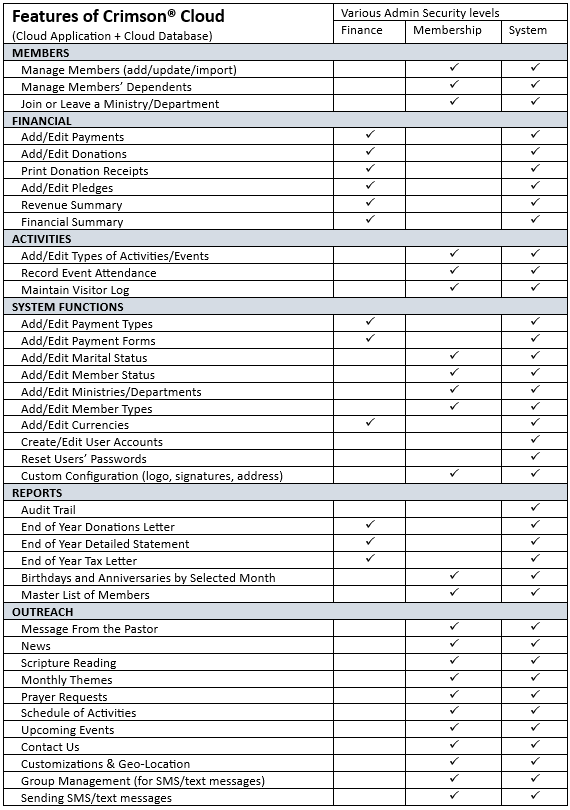
System Requirements
-
Operating System
While Crimson CMS HYBRID is accessible from anywhere, Crimson CMS LOCAL requires installation on a Windows PC with a minimum OS version of Windows 10.
-
Processor
HYBRID is the web-based version of Dibrosoft’s CMS. The locally installed version (LOCAL) requires a minimum of 2.0 GHz of CPU processing power.
-
Memory
Crimson CMS HYBRID has no direct access to or direct demands from your system’s memory resources, but the locally installed version (LOCAL) requires 2GB of memory.
-
Storage
Crimson CMS LOCAL requires a local installation of the application on a Windows PC that has at least 2GB of available hard disk drive space
-
Permissions
Installation of Crimson CMS LOCAL requires administrative privileges on the Windows PC. These privileges are needed only for the software installation.
-
Internet Browser
Crimson CMS HYBRID works on any browser. Dibrosoft offers support for Chrome, Firefox, Safari, and Edge browsers.