

Crimson CMS - LOCAL
Access Crimson LOCAL from a locally installed instance
Manage your members and their dependents’ data
Management payments, pledges, and donations
Print donation receipts
Generate End-of-Year Contribution Letters with a few clicks
Track leadership of various department, ministries, or committees
Reserve and manage hall, chapel, or edifice for rent at custom rates
Print hall/room reservation applications with applicable policies
Why Use Crimson LOCAL?
Dibrosoft’s Crimson Church Management Software (CMS) facilitates effective and efficient pastoral care through spiritual leaders by simplifying church operations management and making crucial and pertinent membership data available to pastors with a few mouse clicks.
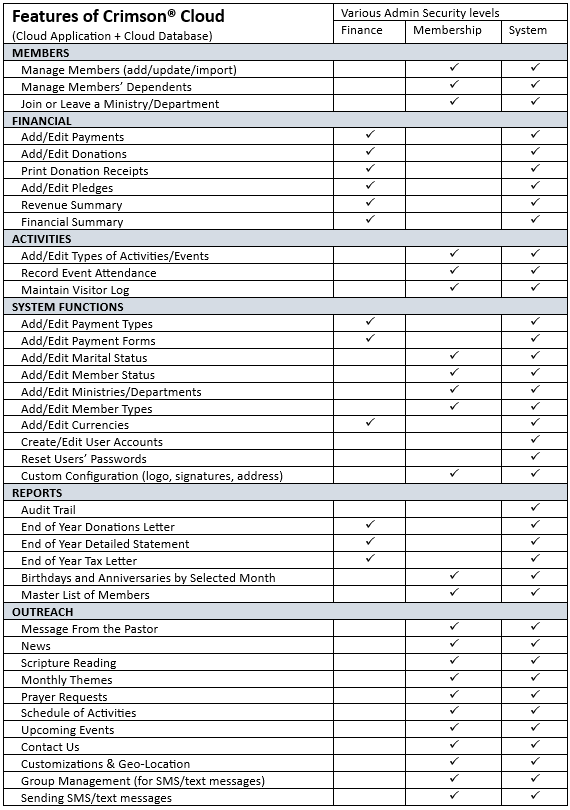
Separate functions and increase security with a Member Admin, Finance Admin, and System Admin roles. Ensure accountability with the built-in Audit Trail System. The Audit Trail System allows a System Admin to review and analyze all actions taken within the CMS to determine who did what when.
Crimson CMS LOCAL is a good option if your organization does not have reliable Internet services 24x7.
Capabilities & Features
-
- Separation of functions (Member Admin vs Financial Admin vs System Admin)
- New Auditor role
- Audit Trail (reporting of who did what when)
- Members and dependents management
- Ministry/Department management
- Facility management & Rental Applications + Forms
- Donations managements & receipts
- Payment (incoming) management
- End of Year Giving Summary
- End of Year Donation summary -
Features of Crimson® LOCAL
MEMBERS
Manage Members (add/update/import)
Manage Members’ Dependents
Join or Leave a Ministry/Department
FINANCIAL
Add/Edit Payments
Add/Edit Donations
Print Donation Receipts
Add/Edit Pledges
Revenue Summary
Financial Summary
ACTIVITIES
Add/Edit Types of Activities/Events
Record Event Attendance
Maintain Visitor Log
SYSTEM FUNCTIONS
Add/Edit Payment Types
Add/Edit Payment Forms
Add/Edit Marital Status
Add/Edit Member Status
Add/Edit Ministries/Departments
Add/Edit Member Types
Add/Edit Currencies
Create/Edit User Accounts
Reset Users’ Passwords
Custom Configuration (logo, signatures, address)
REPORTS
Audit Trail
End of Year Donations Letter
End of Year Detailed Statement
End of Year Tax Letter
Birthdays and Anniversaries by Selected Month
Master List of Members
FACILITY MANAGEMENT
Add/Edit rooms (halls, edifice, chapels)
Set custom pricing for rooms
Reserve/Schedule rooms
Maintain custom list of policies applicable to rental (alcohol, violence, etc)
Download/Print application forms in .PDF format
Features & Admin Matrix
System Requirements
-
Operating System
Crimson CMS LOCAL requires installation on a Windows PC with a minimum OS version of Windows 10.
-
Processor
The locally installed Crimson CMS - LOCAL requires a minimum of 2.0 GHz of CPU processing power.
-
Memory
Crimson CMS - LOCAL requires that a minimum of 2GB of computer memory be available.
-
Storage
Crimson CMS LOCAL installation requires at least 2GB of available hard disk drive space
-
Permissions
Administrative privileges are required for the installation of Crimson CMS - LOCAL on Windows.
-
Internet Browser
Crimson CMS - LOCAL does not use an Internet browser and therefore has no related requirements.